Python Fundamentals II: functions and classes
What is a function?
A function is a way to wrap up a piece of code that performs a specific task. Functions let us:
reuse code without rewriting it
make programs easier to read
structure larger scripts into logical blocks
A function usually takes some inputs (called arguments) and
produces an output (returned using the return keyword).
In everyday language:
A function is a little machine: you give it input → it processes something → it gives you an output.
In programming, functions help us structure code as a sequence of meaningful steps, each responsible for one specific task. Each function does one job well, and the overall program is just the result of these players working together, step by step.
If you find yourself repeating the same logic (calculations, data transformations, formatting, checks etc.) it’s a sign that the step should become a function.
Python Built-in Functions
Python already comes with many pre-defined functions you can use right away. They are loaded automatically every time you run Python, so you don’t need to import anything.
Examples: print(), len(), type(), etc.
Official documentation:
Defining a new Python Function
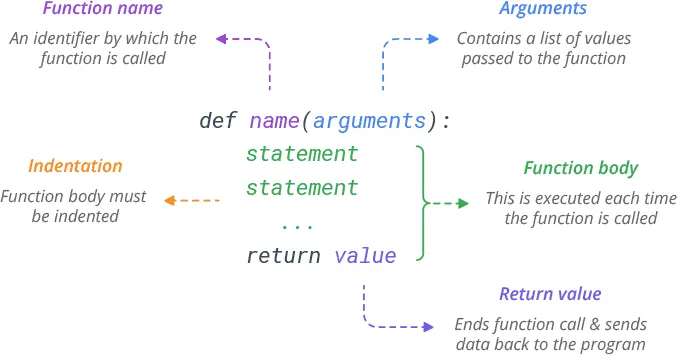
In Python, we define a function using def. A function has:
Name → what we call it
Parameters → placeholders for the inputs
Body → the block of code that does the work
Return value → the output (optional)
Docstring → description of what the function does (optional)
Function Definition vs Function Call
When working with functions, it’s important to understand the difference between:
Defining a function → creating it: “here is what this function does”
Calling a function → running it: “now please do that task”
When we define a function using def, we are simply teaching Python a
new command. Nothing happens yet — Python just stores the function in
memory.
This is also where the function’s local scope is created: variables inside the function exist only while the function runs and disappear afterwards. This keeps your program clean and avoids name conflicts.
When we call the function, Python executes the code inside the body. Each call runs the function’s logic, possibly with different arguments.
Separating definition and calls gives us:
modularity → define once, use many times
flexibility → change the function in one place, all calls update automatically
# Defining your first Python function
def greetings(name):
    """Print a personalized greeting."""
    print(f"Hello, {name}!")

# Calling the greetings function
greetings("Alessandro")
greetings("Mauro")
Arguments and Parameters
When we call a function, we often need to give it information so it can do its job. Python uses two key concepts:
Parameters → the names written in the function definition
Arguments → the values passed when calling the function
Think of it like filling out a form: the form fields are parameters, the information you write in the fields are arguments.
Python supports several types of arguments, each designed to make functions flexible and easy to use.
Positional Arguments The position determines the meaning. Like filling out a form where the first blank must be “animal” and the second must be “name”.
Keyword Arguments Provided by name, so order does not matter. Like writing
animal = "cat"— the computer knows what you mean.Default Arguments A parameter can have a default value, used when the caller does not provide one. It works like a pre-filled value on a form that you can change if you want.
Variable-Length Positional Arguments (
*args) Allows the function to accept any number of positional arguments. Inside the function, they become a tuple.It’s like saying: “Give me all the items you pass; I’ll pack them into a box (a tuple).”
Variable-Length Keyword Arguments (
**kwargs) Lets the function accept any number of keyword arguments, bundled into a dictionary. It’s like letting the user write arbitrary labels and values on a form.
Python requires arguments in this order:
positional →
*args→ keyword → default keyword →**kwargs
This keeps things unambiguous and avoids conflicting meanings.
# Positional arguments: Order matters
def describe_pet(animal, name):
    print(f"I have a {animal} named {name}.")

describe_pet("dog", "Rex")   # correct
describe_pet("Rex", "dog")   # wrong order → wrong meaning
# Keyword arguments: Order does NOT matter
describe_pet(animal="cat", name="Luna")
describe_pet(name="Luna", animal="cat")   # same result
# Using default values
def describe_pet(name, animal="dog"):
    # default: animal = "dog"
    print(f"{name} is a {animal}.")

describe_pet("Buddy")                   # uses default
describe_pet("Whiskers", "cat")         # override default positionally
describe_pet("Rocky", animal="hamster") # override using keyword
# *args: Variable-Length Positional Arguments
def describe_many_pets(animal, *names):
    """Describe several pets of the same animal type."""
    print(f"You have {len(names)} {animal}(s):")
    for name in names:
        print(f" - {name}")

describe_many_pets("dog", "Rex", "Buddy", "Snow")
describe_many_pets("cat", "Luna")
# **kwargs: Variable-Length Keyword Arguments
def describe_pet(animal, name, **details):
    """Describe a pet with optional extra info."""
    print(f"{name} is a {animal}.")
    if details:
        print("Additional details:")
        for key, value in details.items():
            print(f" - {key}: {value}")

describe_pet("dog", "Rex", age=5, color="brown")
describe_pet("cat", "Luna", vaccinated=True)
Return Values
A function does not need to print its result. More commonly, it computes
a value and gives it back using return. The returned value goes back
to the line that called the function, so it can be:
stored in a variable
passed into another function
used in an
ifstatement or loopRule of thumb: use
print(...)for user-facing messages; usereturn ...for data the program needs to keep.
In Python, a function can return any kind of value. This works because everything in Python is an object: whatever can be stored in a variable can also be returned from a function.
Below are the most common (and useful) return types:
# Returning a Single Value
def dog_to_human_years(age):
    """Return a dog's age converted to human years."""
    return age * 7

human_age = dog_to_human_years(4)
print(human_age)  # 28
# Returning Multiple Values
def pet_stats(weight, age):
    """Return weight, age, and a simple BMI-like ratio."""
    return weight, age, weight / age

w, a, ratio = pet_stats(20, 5)
print(w, a, ratio)
# Returning a List
def uppercase_traits(traits):
    """Return a list of traits in uppercase."""
    return [t.upper() for t in traits]

result = uppercase_traits(["playful", "brown", "energetic"])
print(result)
# Returning a Dictionary
def build_pet(name, animal, age=None):
    """Return a dictionary describing a pet."""
    pet = {"name": name, "animal": animal}
    if age is not None:
        pet["age"] = age
    return pet

pet = build_pet("Rex", "dog", age=5)
print(pet)
# Returning Boolean Values
def is_senior_pet(age):
    """Return True if age is considered 'senior' for a pet."""
    return age >= 8

print(is_senior_pet(10))  # True
print(is_senior_pet(4))   # False
# Returning Another Function
def make_feeder(amount):
    """Return a function that feeds a pet by a certain amount (grams)."""
    def feed(food):
        return f"Feed the pet {amount}g of {food}."
    return feed

small_feeder = make_feeder(50)
print(small_feeder("kibble"))
Functions and Modules
Functions help you break your program into small, understandable pieces. But as your code grows, putting all functions in the same notebook or file becomes messy. To keep things organized, Python lets you store functions in separate files called modules.
A module is simply a
.pyfile containing functions (and variables/classes) you want to reuse.
Using modules allows you to:
keep your main program clean
hide implementation details and focus on high-level logic
reuse your functions across multiple scripts
share your function library with others
In practice, a module becomes your own toolbox, just like Python’s built-in modules.
# -----------------------
# Small built-in dataset
# -----------------------
ANIMALS = {
    "Simba":  {"species": "lion",  "habitat": "savannah", "traits": ["strong", "brave"], "details": {"age": 5}},
    "Po":     {"species": "panda", "habitat": "forest",   "traits": ["cute", "hungry"],  "details": {"bamboo_eaten": 30}},
    "Hedwig": {"species": "owl",   "habitat": "forest",   "traits": ["silent", "nocturnal"]},
    "Kaa":    {"species": "snake", "habitat": "jungle",   "traits": ["stealthy"]},
    "Dory":   {"species": "fish",  "habitat": "ocean",    "traits": ["curious"]},
}

# -----------------------
# Lookup helpers
# -----------------------
def exists(name: str) -> bool:
    return name in ANIMALS

def get_animal(name: str):
    return ANIMALS.get(name)

def get_species(name: str):
    a = get_animal(name)
    return a.get("species") if a else None

def get_habitat(name: str):
    a = get_animal(name)
    return a.get("habitat") if a else None

def get_traits(name: str):
    a = get_animal(name)
    return list(a.get("traits", [])) if a else []

# -----------------------
# Tiny knowledge helpers
# -----------------------
def diet_by_species(species: str) -> str:
    s = (species or "").lower()
    carnivores = {"lion", "owl", "snake"}
    herbivores = {"panda"}
    omnivores  = {"bear", "dog", "cat", "fish"}
    if s in carnivores:
        return "carnivore"
    if s in herbivores:
        return "herbivore"
    if s in omnivores:
        return "omnivore"
    return "unknown"

def random_fact_by_species(species: str) -> str:
    s = (species or "").lower()
    facts = {
        "lion":  "Lions live in social groups called prides.",
        "panda": "Pandas can eat bamboo for up to 12 hours a day.",
        "owl":   "Owls can rotate their heads up to 270 degrees.",
        "snake": "Snakes smell with their tongue.",
        "fish":  "Some fish can recognize themselves in a mirror.",
    }
    return facts.get(s, "This species is fascinating—but we need more data!")
# -----------------------
# High-level: showcase
# -----------------------
def animal_showcase(name: str, show_fact: bool = True):
    """Print a short summary for the given animal name."""
    a = get_animal(name)
    if not a:
        print(f"❌ Animal '{name}' not found in the database.")
        return None

    species = a.get("species", "?")
    habitat = a.get("habitat", "?")
    traits  = ", ".join(a.get("traits", [])) or "—"
    diet    = diet_by_species(species)

    print(f"=== ANIMAL: {name} ===")
    print(f"- Species : {species}")
    print(f"- Habitat : {habitat}")
    print(f"- Traits  : {traits}")
    print(f"- Diet    : {diet}")

    if show_fact:
        print(f"- Fact    : {random_fact_by_species(species)}")
Classes and Objects in Python
So far, we’ve learned how to use functions to organize our code: a function groups a set of steps, takes inputs (arguments), and produces results (return values). Functions are great, but as programs grow, we often need to organize data and behaviors that belong together.
For example, imagine our mini animal-encyclopedia getting bigger. Each
animal has specific characteristics (name, species, habitat, traits…)
and could support behaviors (like describe(), feed(), or
move()). Using only dictionaries and standalone functions, we would
need to repeat the same structure again and again. This easily leads to
mistakes (missing keys, inconsistent data, typos), and the data is
always separate from the functions that operate on it.
This is where classes and objects (instances) enter naturally.
Python Class
A class is a template or blueprint for creating things. It answers:
What information does something of this type store? → attributes
What actions can it perform? → methods
Example (conceptually): A
Dogclass defines that every dog has a name, colour, eye colour, height, and length; and that every dog can call methods likegetName()orgetColour().
💡 A class is just the definition — it does not represent a real animal yet.
Python Object / Instance
When we use a class to create a concrete example, we get an object
(or instance). If Dog is the class (blueprint), then Tommy is an
object created from it.
The object has:
real values for the attributes (e.g. Name = Tommy, Colour = Green, Eye_Colour = Brown…)
the same methods defined in the class (
getName(),getColour(), …)
💡 Each object is independent, even though they all come from the same class.
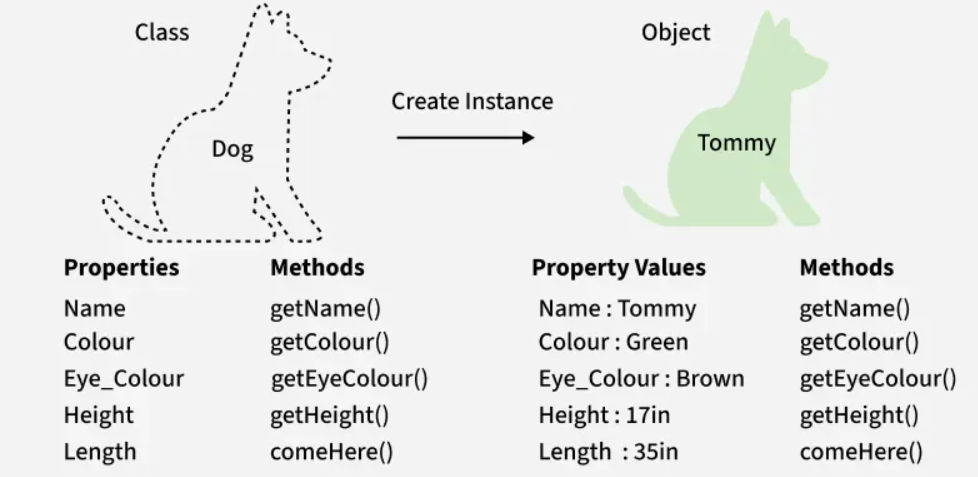
A class keeps the structure, rules, and behaviors in one place. An object represents one specific item following those rules.
You can create thousands of objects from a single class — with no repeated code, no typos, and no inconsistencies.
Defining a new Python Class
To define your own class in Python, we use the keyword class. Inside
the class, we usually define:
Class attributes Values shared by all instances of the class, useful for defaults that are common to every object.
The ``__init__`` method (initializer) A special built-in method that Python automatically calls every time you create (instantiate) a new object from the class. It is the method where you prepare and set up the object’s data and define its initial attributes, which remain attached to that object for its entire lifetime.
Other methods Methods that are not
__init__are simply functions defined inside the class. They describe what the object can do — its behavior.
You can give default values both inside __init__ (each object
gets its own default unless overridden) and as class attributes
(shared across every instance).
Basic structure of a class
class ClassName:

    # --- class attribute (shared by all instances) ---
    class_attribute = value

    def __init__(self, param1, param2, value_with_default=10):
        # --- instance attributes (unique per object) ---
        self.attribute1 = param1
        self.attribute2 = param2
        self.attribute3 = value_with_default

    # --- behavior / method ---
    def method_name(self, other_parameters):
        # action using instance attributes
        print(self.attribute1)
Understanding self in Python Classes
self is a reference to the specific object (instance) that is
being created or used.
When you create an object,
selfrefers to that object. When you call a method,selfrefers to the object that called the method.
You can think of self as:
“self is a way for the object to talk about itself.”
When we create many objects from the same class, each object must store
its own data. self lets Python know which instance we are
referring to.
💡 You do not pass self manually when calling a method — Python
does it automatically.
# Define the class
class Dog:
    """A simple model of a dog."""

    # ---- Class Attribute (shared by all dogs) ----
    species = "Canis familiaris"

    def __init__(self, name, age, friendly=True):
        """
        Initialize the dog's attributes.
        - name and age are instance attributes (unique to each dog)
        - friendly has a default value (True unless overridden)
        """
        self.name = name
        self.age = age
        self.friendly = friendly

    # ---- Instance Methods (behaviors) ----
    def sit(self):
        """Simulate the dog sitting."""
        print(f"{self.name} is now sitting.")

    def roll_over(self):
        """Simulate the dog rolling over."""
        print(f"{self.name} rolled over!")

# Creating "Dog" objects (instances)
my_dog = Dog("Willie", 6)                # friendly defaults to True
your_dog = Dog("Lucy", 3, friendly=False)
# Using attributes and methods
print(my_dog.name, my_dog.age, my_dog.friendly)
print(your_dog.name, your_dog.age, your_dog.friendly)

my_dog.sit()
your_dog.roll_over()
Methods often use the object’s internal data (stored in attributes) to perform actions.
# Accessing class attribute
print(my_dog.species)
print(your_dog.species)
class Dog:
    def __init__(self, name, age):
        self.name = name
        self.age = age

    def birthday(self):
        """Increase the dog's age by 1."""
        self.age += 1
        print(f"{self.name} is now {self.age} years old!")

    def describe(self):
        """Print a description using the dog's attributes."""
        print(f"{self.name} is {self.age} years old.")
dog = Dog("Willie", 6)
dog.describe()     # Willie is 6 years old.
dog.birthday()     # Willie is now 7 years old!
Methods can accept extra parameters, just like regular functions.
class Dog:
    def __init__(self, name):
        self.name = name

    def speak(self, sound):
        """Make the dog speak with a custom sound."""
        print(f"{self.name} says: {sound}!")
dog = Dog("Lucy")
dog.speak("Woof")      # Lucy says: Woof!
dog.speak("Grrrr")     # Lucy says: Grrrr!
Inheritance and Composition
Classes and objects give us two powerful ways to structure code: inheritance and composition. Although they may look similar, they solve different problems.
Inheritance: Creating Specialized Versions of a Class
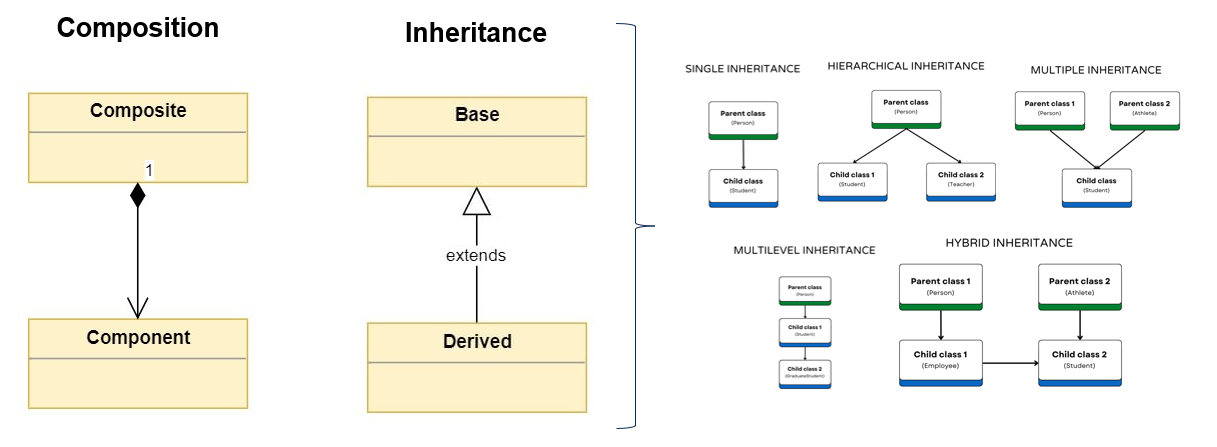
Sometimes you want to build a more specific class based on a more general one. For example: “A Dog is an Animal.”
You define a base class (parent class) and then create child classes (subclasses) that inherit from it. This approach lets you:
reuse code
extend or specialize behavior
avoid rewriting the same attributes or methods repeatedly
Python supports several forms of inheritance:
Single inheritance → one class extends another
Multilevel inheritance → a chain like
Animal → Mammal → DogHierarchical inheritance → one parent with many children (e.g.
Animal → Dog, Cat, Horse)Many Python libraries use inheritance to build complex class hierarchies (models, solvers, API handlers, datasets, widgets…).
Composition: Building Objects Out of Other Objects
While inheritance means “is a” (a Dog is an Animal), composition means “has a” (a Dog has a Collar).
Composition is used when objects need to work together or form a richer structure. It helps build complex systems by combining simple objects, each with a clear responsibility. Each class focuses on one job.
Modern Python libraries rely heavily on composition: data structures, plotting frameworks, user interfaces, and optimization models are all built by combining many smaller objects that work together.
# Inheritance Example: Animal → Dog
class Animal:
    def __init__(self, name):
        self.name = name

    def eat(self):
        print(f"{self.name} is eating.")

# Dog inherits from Animal
class Dog(Animal):
    def bark(self):
        print(f"{self.name} says: Woof!")

# Usage
dog = Dog("Max")
dog.eat()    # inherited from Animal
dog.bark()   # defined in Dog
# Composition Example: Dog with a Collar Object
class Collar:
    def __init__(self, color, size):
        self.color = color
        self.size = size


class Dog:
    def __init__(self, name, age, collar):
        self.name = name
        self.age = age
        self.collar = collar   # Dog owns a Collar object

    def show_collar(self):
        print(f"{self.name}'s collar is {self.collar.color}, size {self.collar.size}.")

# usage
c = Collar("red", "M")
dog = Dog("Bella", 4, c)
dog.show_collar()
Python Packages
A Python package is essentially a collection of modules that bundle
together many classes, functions, and tools designed to solve related
problems. In data-science packages like pandas, matplotlib, or
scikit-learn, all the concepts we introduced—classes, attributes,
methods, inheritance, composition—are used heavily behind the scenes.
Every time you write something like:
df.plot()
model.fit(X, y)
array.mean()
you are interacting with objects created from classes defined inside
the package.
The part before the dot (df, model, array) is an object,
and the part after the dot (plot(), fit(), mean()) is a
method — a function that belongs to that object’s class and knows
how to operate on its internal data.
Packages often build large systems by combining (composition) or extending (inheritance) many classes. For example:
a
DataFrameobject is composed of manySeriesobjectsa
LinearRegressionmodel inherits behavior from more general estimator classesplotting functions internally rely on multiple helper objects working together
In simple terms: a Python package is a toolbox of pre-built objects, each with its own data and behavior. When you use dot-notation, you’re calling a method defined inside the class.
How to Learn a Python Package
When approaching a new package, the best strategy is structured and simple:
Start from the official documentation Every major package has an API reference (lists all classes and methods) and tutorials/user guides. This is your map.
Identify the main objects (classes) Understanding the main objects reveals most of how the package works.
Examples: - pandas →
DataFrame,Series- numpy →ndarray- matplotlib →Figure,AxesYou can inspect objects using
dir()orhelp()directly inside Python.Learn the key methods Each method has specific parameters and well-defined outputs. Examples:
df.head(),df.describe(),array.reshape(),array.sum().Read simple examples They show how the pieces fit together—especially how methods act on object attributes.
Experiment Modify examples, break them, change parameters, inspect results. Ask: What other methods does this object have? What does it return?